portable-hermes-agent
Hermes Agent made portable desktop for Windows — 100 tools, GUI, local models via LM Studio, TTS, Music, ComfyUI, workflows, tool maker. No install. No Docker. No admin rights.
Safety scan
A static text scan, not a guarantee. Select the badge to see what was scanned and every finding.
Check it deeper on your machine
It has changed since its scan on 11 Nov 2026.
As a Claude Code plugin, install it and then ask Claude Code:
/plugin marketplace add keithmackay/mackayi/plugin install scanskillsafety@mackayiDo a deep scan of https://github.com/aivrar/portable-hermes-agent with scanskillsafety
Or from a terminal, clone it and run it:
git clone https://github.com/keithmackay/scanskillsafety-skill ~/.claude/skills/scanskillsafetynode ~/.claude/skills/scanskillsafety/cli.cjs --deep 'https://github.com/aivrar/portable-hermes-agent'
It checks the exact commit: every file, its packages against OSV (api.osv.dev), how it compares with this page's scan (findsafeskills.com receives the repository's address), and, if you agree, Claude reading every file with your own Claude subscription. It never runs the code.
Badge for your README

Markdown
[](/listings/aivrar--portable-hermes-agent)HTML
<a href="/listings/aivrar--portable-hermes-agent"><img src="/api/listings/aivrar--portable-hermes-agent/badge.svg" alt="findsafeskills safety rating" /></a>Install
Install instructions from the README
As written by the repo's author. findsafeskills has not verified these steps.
1. Download
Download the latest `portable-hermes-agent-v*.zip` from [Releases](https://github.com/aivrar/portable-hermes-agent/releases/latest), then extract it to a normal folder.
Recommended:
C:\Users\YourName\Portable-Hermes-Agent
Avoid protected folders such as `C:\Program Files`.
2. Start
Double-click:
START.bat
On first launch, `START.bat` runs the portable setup automatically. It downloads embedded Python, dependencies, LM Studio SDK, and Node.js tools into this folder only. No admin rights are needed.
Manual setup:
install.bat
PowerShell users can run:
.\scripts\install.ps1
3. Launch Again
START.bat           :: easiest GUI launch
UPDATE.bat          :: safest one-click update
hermes_gui.bat      :: GUI mode
hermes.bat          :: CLI mode
Updating
Portable Hermes has **two independent update channels**. Updating one does not automatically update the other.
| Update channel | What it updates | How to run it | |---|---|---| | **Portable Hermes distribution** | The Windows launchers, integrations, portable tools, and the Hermes version tested with this repository | Close Hermes, then double-click `UPDATE.bat` | | **Upstream Hermes Agent** | Newer core agent code from `NousResearch/hermes-agent` | Start Hermes and ask it to check or run its upstream updater |
For the normal, safest maintenance path, close other Hermes windows and gateways, then double-click:
UPDATE.bat
Or run:
hermes.bat update --backup --yes
This updates from `aivrar/portable-hermes-agent`, makes a backup when requested, and preserves runtime folders such as `.hermes/`, `.hermes/custom_tools/`, `.hermes/extensions/`, `extensions/`, and `python_embedded/`. The portable Node.js runtime is stored under `HERMES_HOME/node/`, so it also survives both update types without modifying a system Node installation.
If you also want newer upstream Hermes code, start Hermes after the Portable update and ask:
> Check whether upstream Hermes Agent has updates. Do not install anything yet.
Then, if you want the available update, ask:
> Update upstream Hermes Agent while preserving Portable Hermes. When finished, tell me whether I should restart.
Restart Hermes after a successful upstream update so the running process loads the new Python modules. A Git checkout can report an exact ahead/behind count; a release ZIP has no Git history, so it reports ZIP-overlay mode instead and can still install the latest upstream code.
Most users do not need daily updates. Run the Portable updater when a release, fix, or security notice is published (or every week or two), and check upstream weekly if you want newer Hermes features. Checking daily is optional.
See **[Keeping Portable Hermes Updated](https://github.com/aivrar/portable-hermes-agent/wiki/Keeping-Portable-Hermes-Updated)** for the complete workflow, backups, release-ZIP behavior, and troubleshooting.
4. Connect an AI Model
**Cloud (2 minutes, free):** 1. File > API Key Setup > OpenRouter 2. Sign up at openrouter.ai (free, no credit card) 3. Paste your API key 4. Start chatting
**Local (needs NVIDIA GPU):** 1. Download [LM Studio](https://lmstudio.ai) 2. Download a model, start the server 3. Tools > LM Studio in the GUI 4. Load model, click "Use for Chat"
---
What was scanned
The files the safety scan read, as written by the repository's author and shown as plain text. Lines with a finding are marked.
README.md · README · 320 lines
View this file on GitHub (read at the repository's current version: the scan did not record which commit it read)
This file has changed since it was scanned, so this is not exactly the text that was scanned, and no line is marked. The findings are listed with the safety scan above.
- # Portable Hermes Agent
- <p align="center">
- <a href="README.md"><img src="https://img.shields.io/badge/Language-English-blue?style=for-the-badge" alt="English"></a>
- <a href="README.zh-TW.md"><img src="https://img.shields.io/badge/Language-Traditional_Chinese-purple?style=for-the-badge" alt="Traditional Chinese"></a>
- <a href="README.zh-CN.md"><img src="https://img.shields.io/badge/Language-Simplified_Chinese-red?style=for-the-badge" alt="Simplified Chinese"></a>
- <a href="README.es.md"><img src="https://img.shields.io/badge/Language-Spanish-yellow?style=for-the-badge" alt="Spanish"></a>
- <a href="README.ur-pk.md"><img src="https://img.shields.io/badge/Language-Urdu-green?style=for-the-badge" alt="Urdu"></a>
- </p>
- <p align="center">
- <b>An AI agent with a desktop app, in one folder, for Windows.</b><br>
- Unzip, double-click <code>START.bat</code>, chat. No installer, no Docker, no admin rights.
- </p>
- <p align="center">
- <a href="https://github.com/aivrar/portable-hermes-agent/releases/latest"><img src="https://img.shields.io/github/v/release/aivrar/portable-hermes-agent?label=download" alt="Latest release"></a>
- <a href="https://github.com/aivrar/portable-hermes-agent/actions/workflows/portable-integrity.yml"><img src="https://img.shields.io/github/actions/workflow/status/aivrar/portable-hermes-agent/portable-integrity.yml?branch=main&label=tests" alt="Tests"></a>
- <img src="https://img.shields.io/badge/Windows-10%20%7C%2011-0078D6" alt="Windows 10 and 11">
- <a href="LICENSE"><img src="https://img.shields.io/badge/license-MIT-green" alt="MIT License"></a>
- </p>
- <p align="center">
- <a href="https://github.com/aivrar/portable-hermes-agent/wiki"><img src="https://raw.githubusercontent.com/wiki/aivrar/portable-hermes-agent/images/hero.gif" alt="Portable Hermes Agent: chat with tools, the LM Studio panel, GPU choices, permissions, extensions and the API key wizard" width="900"></a>
- </p>
- <p align="center">
- <a href="https://github.com/aivrar/portable-hermes-agent/releases/latest"><b>Download</b></a> ·
- <a href="https://github.com/aivrar/portable-hermes-agent/wiki/Getting-Started">Getting started</a> ·
- <a href="https://github.com/aivrar/portable-hermes-agent/wiki">Wiki</a> ·
- <a href="https://github.com/aivrar/portable-hermes-agent/wiki/Troubleshooting">Troubleshooting</a> ·
- <a href="https://github.com/aivrar/portable-hermes-agent/discussions">Discussions</a>
- </p>
- Portable Hermes Agent is [NousResearch/hermes-agent](https://github.com/NousResearch/hermes-agent) (MIT License) packaged for people who do not want to set up Python: a desktop GUI, 100 tools, local models through LM Studio, speech, music and image generation, workflows and a tool maker. Everything lives in the folder you extract; delete the folder and it is gone.
- ## Start in three steps
- 1. **Download** `portable-hermes-agent-v*.zip` from the [latest release](https://github.com/aivrar/portable-hermes-agent/releases/latest) and extract it to a normal folder such as `C:\PortableHermes`. Use that file, not the green **Code > Download ZIP** button.
- 2. **Double-click `START.bat`.** The first start downloads Python and the newest Hermes Agent into the folder (internet needed, typically a few minutes), then opens the app.
- 3. **Connect a model.** Paste a free [OpenRouter](https://openrouter.ai) key in the setup wizard, or open **Tools > LM Studio** to use a model on your own GPU.
- To update later, close Hermes and double-click `UPDATE.bat`. Your keys, settings, chats and files are not touched. Details are under [Quick Start](#quick-start) and in the [wiki](https://github.com/aivrar/portable-hermes-agent/wiki/Keeping-Portable-Hermes-Updated).
- ## What it looks like
- | | |
- |---|---|
- | [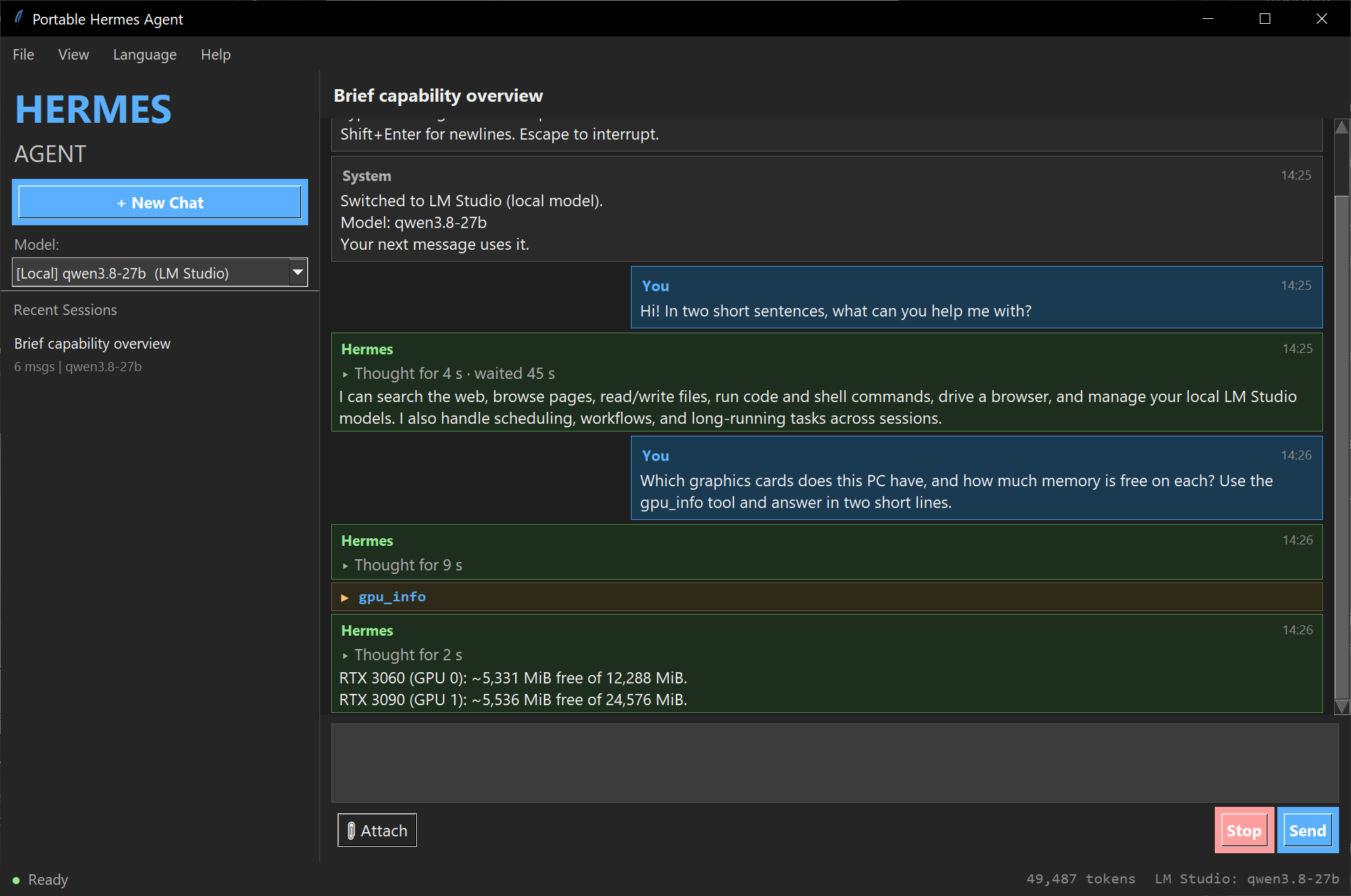](https://github.com/aivrar/portable-hermes-agent/wiki/The-Interface)<br>**Chat.** Hermes answers and uses tools (here `gpu_info`). Sessions are kept in the sidebar. | [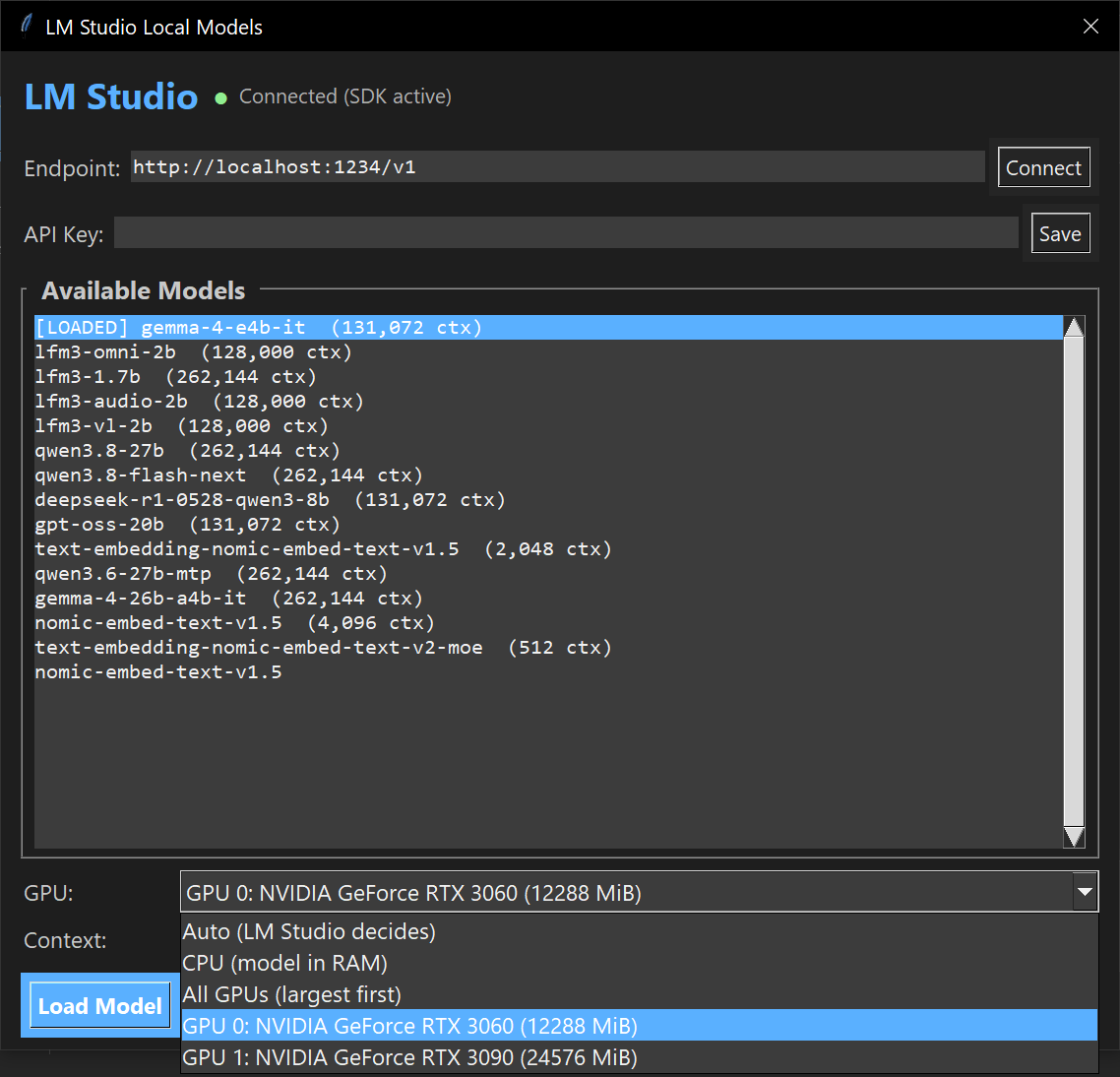](https://github.com/aivrar/portable-hermes-agent/wiki/LM-Studio-Guide)<br>**Local models.** Load a model from LM Studio on one card, across all cards, or in RAM. |
- | [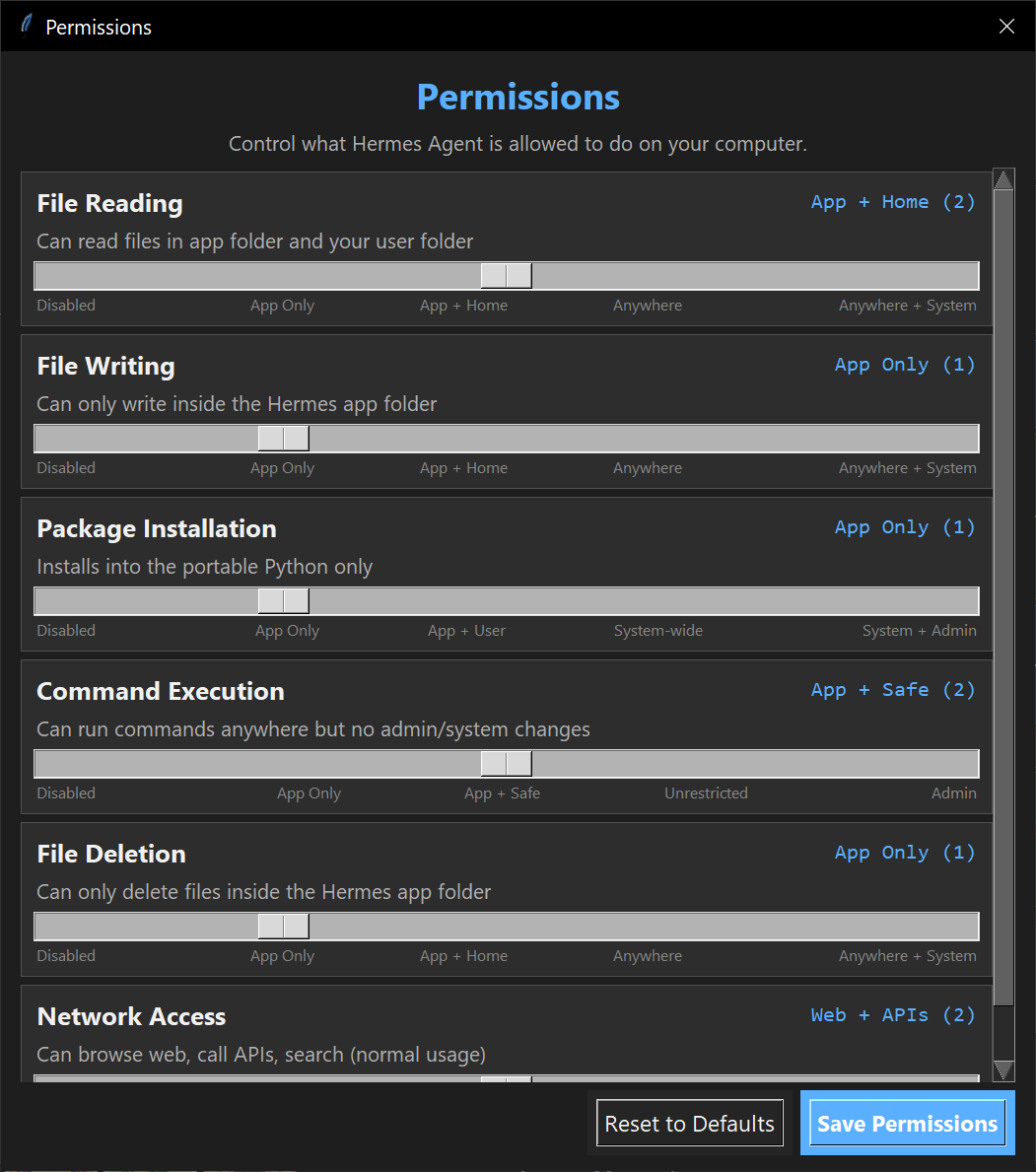](https://github.com/aivrar/portable-hermes-agent/wiki/Permissions)<br>**Permissions.** You set how far the agent may read, write, install, run and delete. | [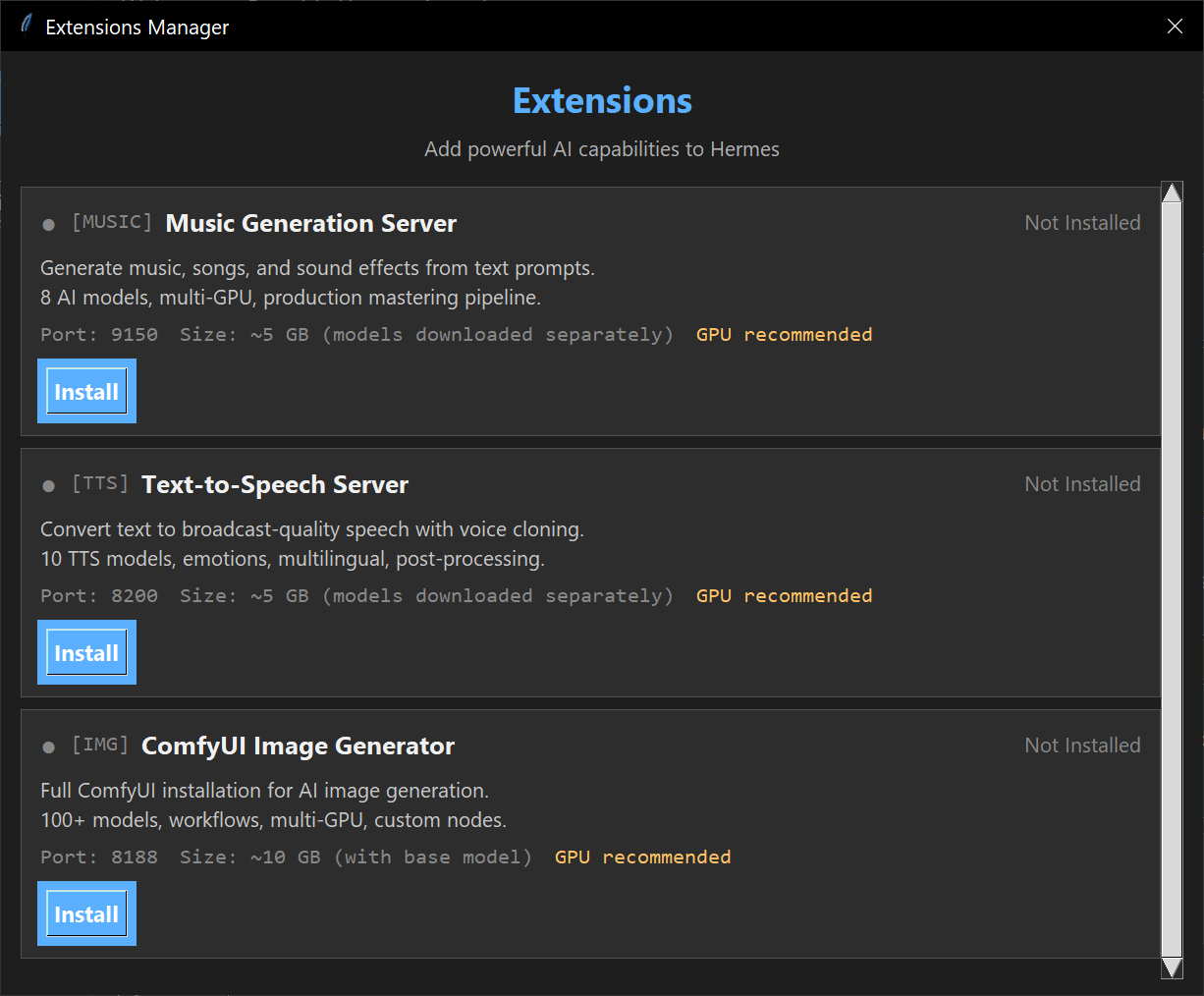](https://github.com/aivrar/portable-hermes-agent/wiki/Extensions-Overview)<br>**Extensions.** One-click speech, music and image servers, also portable. |
- ---
- ## Features
- ### Desktop GUI
- - Dark-themed Tkinter interface with chat, sidebar, and session management
- - Multi-language support — English, Traditional Chinese (繁體中文), Simplified Chinese (简体中文), and Spanish (Español) with runtime switching
- - Image attachment with thumbnails (vision model support)
- - Guided mode — works even without an AI model connected
- - API key setup wizard with individual service configuration
- - Permissions panel with granular control over file, network, and system access
- ### 100 Tools Across 20+ Toolsets
- | Toolset | Tools | What It Does |
- |---------|-------|-------------|
- | **LM Studio** | 10 | Load/unload models, search HuggingFace, tokenize, embed, direct chat, API key management, model list retrieval |
- | **Music** | 7 | Generate music, manage models, GPU workers, output library |
- | **TTS** | 7 | Text-to-speech, 10 voice models, voice cloning, job management |
- | **ComfyUI** | 7 | Image generation, instance management, model/node browsing |
- | **Workflows** | 6 | Create, run, schedule, and manage multi-step automation pipelines |
- | **Tool Maker** | 3 | Dynamically create API wrapper or Python handler tools at runtime |
- | **Serper** | 1 | Google-quality search via Serper.dev API |
- | **Guide** | 1 | Searchable built-in user manual |
- | **GPU** | 1 | NVIDIA GPU status (memory, temp, utilization) |
- | **Model Switcher** | 1 | Switch between cloud and local AI models |
- | **Hermes Update** | 2 | Check for and install the latest upstream Hermes core; portable tools, extensions, and your data are left alone |
- Plus all built-in hermes-agent tools: web search, file operations, browser automation, code execution, delegation, memory, skills, messaging, Home Assistant, and more.
- The LM Studio panel saves its endpoint and API key in the active `HERMES_HOME`
- directory (`.lmstudio_config`), outside the application source. Both update paths
- preserve this user data; release archives exclude it. Clear the key field and
- click **Save** to remove a saved key. The saved key is also used for GUI chat.
- Keep this file private. SDK model-loading with authentication requires a version
- of the LM Studio Python SDK that supports `api_token`; REST model discovery and
- chat remain available when the optional SDK cannot connect.
- ### Extension Modules
- Three portable AI generation servers from [aivrar](https://github.com/aivrar):
- | Extension | Port | Models | GPU |
- |-----------|------|--------|-----|
- | **[TTS Server](https://github.com/aivrar/portable-tts-server)** | 8200 | Kokoro, XTTS, Dia, Bark, Fish, + 5 more | 4 GB+ |
- | **[Music Server](https://github.com/aivrar/portable-music-server)** | 9150 | MusicGen, Stable Audio, ACE-Step, Riffusion | 4 GB+ |
- | **[ComfyUI](https://github.com/aivrar/comfyui-portable-installer)** | 5000 | SD 1.5, SDXL, Flux, 100+ registry models | 6 GB+ |
- Each extension auto-installs on first use. No system dependencies.
- ### Workflow Engine
- Chain tool calls into automated pipelines with data flow, conditions, loops, parallel execution, error handling, and cron scheduling.
- ### Dynamic Tool Maker
- Create new tools at runtime — wrap any REST API or write custom Python handlers. Tools persist across sessions and reload automatically.
- ### Guided Mode
- No API key? No problem. The chat works offline using a built-in 1,054-line user guide. New users get step-by-step guidance to set up their first AI model.
- ---
- ## Quick Start
- ### 1. Download
- Download the latest `portable-hermes-agent-v*.zip` from [Releases](https://github.com/aivrar/portable-hermes-agent/releases/latest), then extract it to a normal folder. Use that file: GitHub's green **Code > Download ZIP** button and the "Source code" downloads lack the portable tools, and `START.bat` in such a folder only says so.
- Recommended:
- ```text
- C:\Users\YourName\Portable-Hermes-Agent
- ```
- Avoid protected folders such as `C:\Program Files`. Spaces and characters such as `&`, `(`, `)` and `'` in the folder path are fine, but the launchers refuse to start from a folder whose path contains `!`, `%` or `^` (and from a `HERMES_HOME` containing `!`), because Windows batch files cannot handle those characters safely.
- ### 2. Start
- Double-click:
- ```batch
- START.bat
- ```
- From PowerShell, run `.\START.bat` (or `.\install.bat` for setup only). Upstream's `scripts\install.ps1` installs a regular, non-portable Hermes with its own uv-managed Python; the portable bundle does not use it.
- On first launch, `START.bat` runs the portable setup automatically. It downloads embedded Python 3.14, the **latest Hermes Agent core from [NousResearch/hermes-agent](https://github.com/NousResearch/hermes-agent)**, its exact pinned dependencies, and the LM Studio SDK into this folder only. No admin rights are needed. The new core is checked in a separate process (portable tools, CLI and GUI tool selection, GUI modules) before setup reports success.
- <details>
- <summary><b>Setup options</b> (manual and unattended setup, pinning a core version)</summary>
- Manual setup:
- ```batch
- install.bat
- ```
- Unattended setup (no key presses, for scripts and testing):
- ```batch
- install.bat --yes
- ```
- A first-time setup installs only exact, hash-checked dependency versions from the core's `uv.lock`. If the newest upstream core has no usable lock or cannot run in the portable runtime, setup falls back to the last upstream version this release has verified. To pin a specific upstream version, set `HERMES_PORTABLE_CORE_REF` (a branch, tag, or commit) or `HERMES_PORTABLE_CORE_ZIP` (a downloaded upstream source ZIP) before running `install.bat`.
- </details>
- If setup is interrupted (window closed, network lost), the next `START.bat`, `hermes.bat` or `hermes_gui.bat` runs setup again before starting Hermes.
- ### 3. Launch Again
- ```batch
- START.bat :: easiest GUI launch
- UPDATE.bat :: safest one-click update
- hermes_gui.bat :: GUI mode
- hermes.bat :: CLI mode
- ```
- ### Updating
- Portable Hermes is made of **two parts that update separately**:
- | Part | What it is | Comes from | How to update |
- |---|---|---|---|
- | **Portable wrapper** | Launchers, desktop GUI, portable tools and skills, installer and updater | [aivrar/portable-hermes-agent releases](https://github.com/aivrar/portable-hermes-agent/releases/latest) | Close Hermes, then double-click `UPDATE.bat` |
- | **Hermes core** | The agent itself | [NousResearch/hermes-agent](https://github.com/NousResearch/hermes-agent) (latest `main`) | `UPDATE.bat` offers it after the wrapper step; or `UPDATE.bat --core`; or ask Hermes to update itself |
- Close other Hermes windows and gateways, then double-click:
- ```batch
- UPDATE.bat
- ```
- 1. **Wrapper:** downloads the latest Portable Hermes release, checks the hash of every file, replaces only wrapper files, checks that the result starts, and rolls back if anything fails.
- 2. **Core:** shows how many upstream commits behind your core is and asks `Update the Hermes core now? [y/N]`.
- Never touched by either update: `.env`, `cli-config.yaml`, your Hermes home folder (chats, settings, custom tools), `extensions\`, `workflows\` and `workspace\`. If an update fails, it is rolled back. Coming from v1.4.18 or older, run `UPDATE.bat` twice: the first run installs the new launchers and asks for the second. The full guide is [Keeping Portable Hermes Updated](https://github.com/aivrar/portable-hermes-agent/wiki/Keeping-Portable-Hermes-Updated).
- <details>
- <summary><b>Update details</b> (unattended options, the Python upgrade, how an update protects your install, git clones)</summary>
- Unattended: `UPDATE.bat --yes` updates the wrapper only; `UPDATE.bat --yes --core` updates both; `UPDATE.bat --yes --no-core` never touches the core. `hermes.bat update ...` accepts the same options.
- **When the newest core needs a newer Python.** Installs made before the evergreen wrapper (v1.4.18 and earlier) have embedded Python 3.13, and the current upstream core needs 3.14. The core step then explains what will happen and asks `Upgrade the portable Python to 3.14.9 now? [y/N]`:
- - It renames `python_embedded` to `python_embedded.old-<version>` (kept, not deleted), downloads the new Python and Tcl/Tk (about 18 MB) and the packages Hermes needs (typically 150-300 MB), then installs and tests the newest core. This usually takes 5 to 15 minutes. Close Hermes first.
- - If the new core cannot be installed, the upgrade is undone: the old Python folder is renamed back and your core stays as it was.
- - If the window is closed or the PC loses power during the upgrade, the next start of Hermes (or `install.bat`) finishes it, or undoes it, before anything else runs. It does not ask again. A half-built new Python is moved to `python_embedded.failed-<version>`, never deleted.
- - The list of packages the old Python had is saved in `.portable\`. Delete `python_embedded.old-<version>` yourself once Hermes works for you.
- - Answering `N` changes nothing; run `UPDATE.bat --core` when you are ready. `UPDATE.bat --yes --core` upgrades without asking.
- If you are coming from v1.4.18 or older, the first `UPDATE.bat` installs the new launchers and asks you to run `UPDATE.bat` once more; that second run finishes the update.
- You can also ask Hermes in the chat:
- > Check whether upstream Hermes Agent has updates. Do not install anything yet.
- > Update upstream Hermes Agent. When finished, tell me whether I should restart.
- How a core update protects your install:
- - The new core is downloaded and unpacked in a staging folder (`.portable\`), its dependencies are installed, and it is tested in a separate process before any file is replaced. Dependencies come from the core's `uv.lock` with hashes; if an updated core has no usable lock, the update installs from the version ranges in `pyproject.toml` without hashes and says so.
- - Files are swapped with a journal; if the swap or the second test fails, every file goes back to how it was. If the update is interrupted (power loss, window closed), the next launch settles it before any Hermes code runs: it is rolled back, or finished if it had already been committed.
- - Changed Python packages are put back to their previous versions and the result is checked. If that cannot be completed (for example because a package file is in use, or the update was interrupted while it was changing packages), the update says so, a note appears whenever Hermes starts in a console window, and running `UPDATE.bat` again finishes it. When a running Hermes has a package loaded, pip can leave folders whose names start with `~` in `python_embedded\Lib\site-packages`; they are harmless and can be deleted once Hermes is closed.
- - Only files the previous core installed, and that you have not edited, are ever removed. A file you edited that an update (or launch-time repair) would replace is first copied to a dated folder under `.portable\kept\`. Files nobody recorded are never deleted. The first core update of an install made with v1.4.18 or older has no record of the previous core's files, so it keeps a copy of every one it replaces or removes, and says how many, where and how large that folder is; delete it once Hermes works.
- - Never touched by either update: `.env`, `cli-config.yaml`, `HERMES_HOME` (default `%USERPROFILE%\.hermes`, including custom tools, the LM Studio settings, language and other GUI preferences), `extensions\`, `node_modules\`, `workflows\`, `workspace\`, and built desktop apps in `apps\desktop\release\`. `python_embedded\` changes only when a core update installs the packages that core needs, and in the Python upgrade above, which keeps the old folder.
- Restart Hermes after a core update so the running process loads the new code. Every launch also restores any portable file that something else (for example upstream's own `hermes update`) replaced or removed, so the portable tools never silently disappear.
- The four launchers in the folder (`START.bat`, `UPDATE.bat`, `hermes.bat`, `hermes_gui.bat`) are one-line files that start the real scripts in `portable_hermes\launch\`. Windows reads a running batch file from disk line by line, so keeping the root files to one line is what lets an update replace the launch scripts safely while a launcher is running. Your arguments reach Hermes exactly as typed, including `%`, `^`, `!`, `&` in quotes, and parentheses.
- Most users do not need daily updates. Run `UPDATE.bat` when a release, fix, or security notice is published (or every week or two). Checking daily is optional.
- **Git clones** (developers): this repository holds only the portable wrapper. Run `START.bat` in a clone to install the Hermes core into it (git ignores the core, the portable Python and your data at the paths Hermes uses); then `git pull` updates the wrapper and `UPDATE.bat` the core. Those ignored files live inside the git folder, so never run `git clean -x` (it deletes them) or `git clean -fd` (it deletes untracked files in the wrapper folders) in a clone you use; for a pristine tree, make a second clone. To run the tests, see [Developing from a clone](docs/portable-release-checklist.md#developing-from-a-clone).
- </details>
- ### 4. Connect an AI Model
- **Cloud (2 minutes, free):**
- 1. File > API Key Setup > OpenRouter
- 2. Sign up at openrouter.ai (free, no credit card)
- 3. Paste your API key
- 4. Start chatting
- **Local (needs NVIDIA GPU):**
- 1. Download [LM Studio](https://lmstudio.ai)
- 2. Download a model, start the server
- 3. Tools > LM Studio in the GUI
- 4. Load model, click "Use for Chat"
- ---
- ## Requirements
- - Windows 10/11
- - Internet connection for setup and updates; for chatting, either a cloud AI account or an NVIDIA GPU with 8GB+ (for local AI)
- - No admin rights, no system Python, no Docker
- - A short folder path such as `C:\PortableHermes` if Windows long paths are turned off (upstream ships deeply nested files; setup and updates explain the limit if your path is too long)
- ---
- ## Documentation
- The [wiki](https://github.com/aivrar/portable-hermes-agent/wiki) is the current manual:
- | I want to... | Page |
- |---|---|
- | Install and connect a first model | [Getting Started](https://github.com/aivrar/portable-hermes-agent/wiki/Getting-Started) |
- | Find my way around the app | [The Interface](https://github.com/aivrar/portable-hermes-agent/wiki/The-Interface) |
- | Run models on my own GPU | [LM Studio Guide](https://github.com/aivrar/portable-hermes-agent/wiki/LM-Studio-Guide) |
- | Decide what the agent may do | [Permissions](https://github.com/aivrar/portable-hermes-agent/wiki/Permissions) |
- | Add speech, music or images | [Extensions Overview](https://github.com/aivrar/portable-hermes-agent/wiki/Extensions-Overview) |
- | Update safely | [Keeping Portable Hermes Updated](https://github.com/aivrar/portable-hermes-agent/wiki/Keeping-Portable-Hermes-Updated) |
- | Fix a problem | [Troubleshooting](https://github.com/aivrar/portable-hermes-agent/wiki/Troubleshooting) |
- Questions and ideas are welcome in [Discussions](https://github.com/aivrar/portable-hermes-agent/discussions); bugs in [Issues](https://github.com/aivrar/portable-hermes-agent/issues).
- A searchable user guide is also built into the agent — ask it anything or use the `search_guide` tool. The [PDF manual](https://github.com/aivrar/portable-hermes-agent/releases/latest) is included in every release; its setup and update chapters describe older releases (see `START_HERE.txt` and this README for the current flow).
- Key topics: getting started, API setup, the interface, permissions, LM Studio local models, extensions (TTS/Music/ComfyUI), all 100 tools, custom tool creation, workflows, and a glossary of AI terms.
- ---
- ## Architecture
- ```
- Portable wrapper (this repository) Hermes core (NousResearch/hermes-agent)
- START.bat / UPDATE.bat / hermes*.bat installed by portable_hermes at setup,
- gui/ desktop GUI updated by UPDATE.bat --core,
- tools/* portable tools (self-register) recorded in .portable/core-state.json
- skills/* portable skills
- portable_hermes ownership model, core and wrapper updaters,
- launch-time repair, and the toolsets bridge that offers
- the portable tools in upstream's default tool selection
- (in memory; no upstream file is edited)
- User
- |
- v
- GUI (Tkinter) / CLI
- |
- v
- Agent Bridge (threading, sessions)
- |
- v
- AIAgent (run_agent.py, upstream)
- |
- +-- Tool Registry (100 tools)
- | +-- LM Studio tools (SDK + HTTP)
- | +-- Extension tools (Music, TTS, ComfyUI)
- | +-- Workflow engine
- | +-- Tool maker (dynamic creation)
- | +-- Serper, GPU, Guide, etc.
- | +-- Custom tools (user-created)
- |
- +-- LLM Provider
- +-- OpenRouter (cloud)
- +-- LM Studio (local, GPU)
- +-- Any OpenAI-compatible endpoint
- ```
- ---
- ## Credits
- - **Base framework**: [NousResearch/hermes-agent](https://github.com/NousResearch/hermes-agent) (MIT License)
- - **Extension modules**: [aivrar](https://github.com/aivrar) — portable-tts-server, portable-music-server, comfyui-portable-installer
- - **Custom tools, GUI, and integrations**: Built with [Claude Code](https://claude.ai/claude-code)
- ---
- ## License
- MIT License — see [LICENSE](LICENSE) for details.
- Original framework copyright (c) 2025 Nous Research.
Ratings and comments
Sign in to rate this skill.
Sign inFree to use. If it’s helped, pass it on.