adobe-agent-skills
AI agent skills for Adobe After Effects automation — describe what you want, and we'll generate and execute the code.
Safety scan
A static text scan, not a guarantee. Select the badge to see what was scanned and every finding.
Badge for your README

Markdown
[](/listings/aedev-tools--adobe-agent-skills)HTML
<a href="/listings/aedev-tools--adobe-agent-skills"><img src="/api/listings/aedev-tools--adobe-agent-skills/badge.svg" alt="findsafeskills safety rating" /></a>Install
Install instructions from the README
As written by the repo's author. findsafeskills has not verified these steps.
1. **Install the skill:**
npx skills add aedev-tools/adobe-agent-skills
2. **Enable scripting in After Effects:**
Preferences > Scripting & Expressions > **"Allow Scripts to Write Files and Access Network"**
3. **Start prompting.** Open your AE project, open your coding agent, and describe what you want.
What was scanned
The files the safety scan read, as written by the repository's author and shown as plain text. Lines with a finding are marked.
README.md · README · 117 lines
View this file on GitHub (read at the repository's current version: the scan did not record which commit it read)
- # Adobe Suite Skills
- AI agent skills for creative tools. Start with After Effects automation — describe what you want in natural language, and Claude Code (or other agents) will generate and execute the code for you.
- Built by [aedev.tools](https://aedev.tools)
- 
- ```bash
- npx skills add aedev-tools/adobe-agent-skills
- ```
- ---
- ## What it does
- - **Reads your project** — understands your comps, layers, properties, keyframes, and expressions
- - **Generates and runs ExtendScript** — you describe what you want, it writes and executes the code
- - **Covers the full AE workflow** — layers, keyframes, expressions, effects, compositions, assets, and rendering
- - **Always undoable** — every action wraps in an undo group, Cmd+Z always works
- ## Example prompts
- ```
- "Animate the table rows in one by one with a slide-up and fade, staggered 0.12s apart"
- ```
- ```
- "Add a drop shadow to every text layer in this comp and set them all to multiply"
- ```
- ```
- "Create a lower-third with a background bar, text, and a line accent — animate it sliding in from the left"
- ```
- ```
- "Find all missing footage in this project and tell me which comps are affected"
- ```
- ```
- "Precompose all the icon layers into a single comp and loop them"
- ```
- ```
- "Add expression controls to this null so I can drive all the text colors from one place"
- ```
- ## Setup
- 1. **Install the skill:**
- ```bash
- npx skills add aedev-tools/adobe-agent-skills
- ```
- 2. **Enable scripting in After Effects:**
- Preferences > Scripting & Expressions > **"Allow Scripts to Write Files and Access Network"**
- 3. **Start prompting.** Open your AE project, open your coding agent, and describe what you want.
- ## Requirements
- - Adobe After Effects (any recent version)
- - macOS (Windows support coming soon)
- - A coding agent that supports [Agent Skills](https://agentskills.io) (Claude Code, Cursor, etc.)
- ## What's inside
- The skill includes domain knowledge and tooling across the full After Effects scripting API:
- | Domain | Coverage |
- |---|---|
- | Layers | Create, delete, duplicate, reorder, parent, configure |
- | Keyframes & Animation | Set keyframes, easing, interpolation, temporal/spatial control |
- | Expressions | Write, link, and debug expressions |
- | Effects | Add and configure effects by matchName |
- | Compositions | Create, precompose, nest, configure |
- | Assets & Footage | Import, replace, organize footage |
- | Rendering | Render queue, output modules, export |
- | Batch Operations | Bulk modifications across layers and comps |
- **34 built-in scripts** that handle common tasks without generating code:
- | Script | What it does |
- |---|---|
- | Trim Comp to Content | Fit comp duration to layer content |
- | Null from Layers | Create controller nulls, auto-parent |
- | Fit to Comp | Scale layers to fit/fill/stretch to comp |
- | Label Layers | Batch-set label colors by type or name |
- | Blend Mode Set | Set blend mode on selected layers |
- | Split Layer | Split layers at the playhead |
- | Layer Stagger | Stagger layers in time |
- | Batch Rename | Bulk rename layers, comps, or items |
- | Easing Presets | Apply smooth, snappy, or bounce easing |
- | Smart Precompose | Precompose with auto-trimmed duration |
- | True Comp Duplicator | Deep-clone comps with independent sub-comps |
- | …and 23 more | Anchor points, expressions, fonts, rendering, cleanup, etc. |
- Plus query scripts that read your project state without stealing focus — from a lightweight overview down to individual layer properties — so the agent only loads the context it needs.
- ## Feedback & Issues
- Found a bug? Have a feature request or idea?
- [Open an issue](https://github.com/aedev-tools/adobe-agent-skills/issues) — let's build this together.
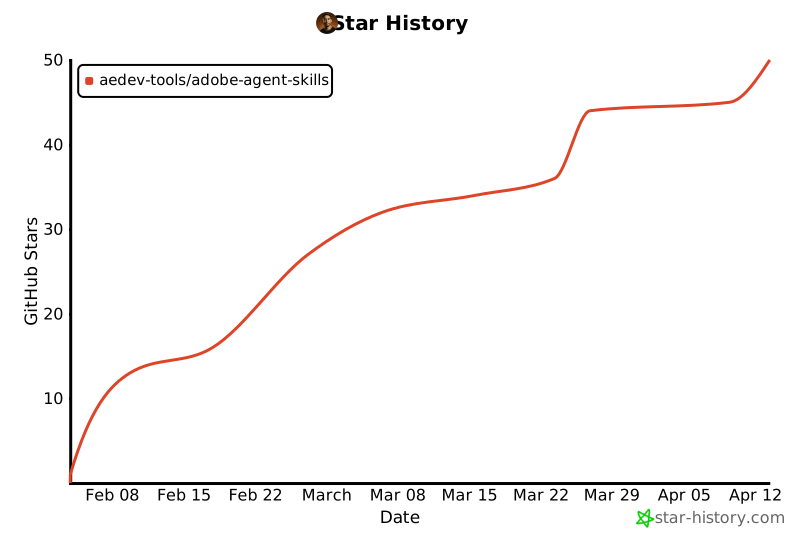
- ## Star History
- [](https://www.star-history.com/)
- ## License
- Apache 2.0 — see [LICENSE](LICENSE) for details.
- ---
- **Made by [aedev.tools](https://aedev.tools)**
Ratings and comments
Sign in to rate this skill.
Sign inFree to use. If it’s helped, pass it on.