Back to search
gdai-mcp-plugin-godot
MCP serverGitHub
A MCP server integration for Godot Engine that allows Claude, Cursor, Windsurf, VSCode, etc to perform actions like creating scenes, resources, scripts, reading errors and much more.
Safety scan
A static text scan, not a guarantee. Select the badge to see what was scanned and every finding.
Checked today
Badge for your README
Markdown
[](/listings/3ddelano--gdai-mcp-plugin-godot)HTML
<a href="/listings/3ddelano--gdai-mcp-plugin-godot"><img src="/api/listings/3ddelano--gdai-mcp-plugin-godot/badge.svg" alt="findsafeskills safety rating" /></a>Install
i
What was scanned
The files the safety scan read, as written by the repository's author and shown as plain text. Lines with a finding are marked.
README.md · README · 166 lines
View this file on GitHub (read at the repository's current version: the scan did not record which commit it read)
- > gdai-mcp-plugin-godot
- # 🤖 GDAI MCP – MCP Server for Godot Game Engine
- **GDAI MCP Godot Plugin** allows AI to control the Godot Editor to create scenes, nodes, scripts. It can debug script errors, debugger and output logs.
- > 🔗 [Get the Plugin (https://gdaimcp.com)](https://gdaimcp.com)
- ---
- ## 🚀 Feature Highlights
- Take your Godot workflow to the next level by automating your game development.
- - **[NEW!] ✨ 📷 Automatically takes screenshots to visually understand the editor and running game.**
- - 🧱 **Create Scenes Programmatically**
- Generates scenes, nodes, resources, scripts and more
- - 🛠️ **Add & Manipulate Nodes**
- Modifies the scene tree adding/removing/updating nodes and their properties
- - 🐞 **Debugger Integration**
- View debugger output, logs and scripts errors.
- - 📁 **File & Asset Search**
- Searches for files and resources directly from the filesystem (`res://`)
- - 📐 **Property Updates**
- Set and get node properties dynamically.
- - 🧩 **Project Understanding**
- Has a deep understanding of your project, scenes and scripts.
- - 📝 **GDScript context**
- Helps you write and debug GDScript
- ---
- ## 🛠️ How It Works
- Use the GDAI MCP Plugin to control Godot from any MCP Client like Cursor, Windsurf, Claude, VSCode etc.
- 1. **Install in Godot Project**
- Add the GDAI MCP Plugin to your Godot project.
- [Installation Guide](https://gdaimcp.com/docs/installation)
- 2. **Add command in MCP Client**
- Add the MCP server command to your MCP Client's config.
- [MCP Client Config](https://gdaimcp.com/docs/installation#2-install-in-mcp-client)
- 3. **Start Chatting**
- Start chatting and see the MCP action!
- [Examples](https://gdaimcp.com/docs/examples)
- ---
- ## 💻 Example
- **User:** Please fix my gdscript errors.
- **Assistant:** I'd be happy to help fix your GDScript errors. Let me start by examining your current scene and looking for any errors in your script.
- Running tool: `get_open_script`
- Running tool: `get_open_script_errors`
- ...conversation continues
- See more examples at the end
- ---
- ## 🤝 Compatible MCP Clients
- Use GDAI MCP with your favorite MCP client or IDE:
- - Cursor
- - Claude Desktop
- - VS Code (via GitHub Copilot, Cline, Roo Code, etc)
- - WindSurf
- - And more
- ## 🤝 Compatible Godot version
- The plugin is compatible with `Godot 4.1+`
- ---
- ## ❓ Frequently Asked Questions
- **What is GDAI MCP Godot Plugin?**
- A plugin that allows any MCP Client to control Godot Engine Editor remotely, allowing it to create scenes, nodes, resources, scripts and more.
- **Can this make an entire game with one shot prompt?**
- Yes and no. It depends on the quality of your prompt and the LLM used. Claude Desktop most of the times is able to one-shot simple games.
- **Is Godot scripting experience required?**
- No, but it's helpful.
- **Which clients are supported?**
- Any MCP client either a program or even a script can connect to the MCP server.
- **Can I use this in commercial projects?**
- Yes! You can use this plugin to make commercial games!
- **Can I use this in a public project?**
- Yes! But make sure to not commit the plugin to the public repository of your game.
- **Is there documentation?**
- Yes, detailed docs are available.
- ---
- ## 🚀 Take Your Godot Workflow to the Next Level
- Unlock the full potential of AI through automated game development via the GDAI MCP Plugin.
- > [🔗 Get the plugin](https://gdaimcp.com)
- ---
- ### 🗣️ Suggestions
- ##### Have any question or feature requests?
- Join the [Discord Server](https://discord.gg/FZY9TqW) or DM `@3ddelano`
- ---
- ### 💡 More examples
- - 3D Minecraft clone
- [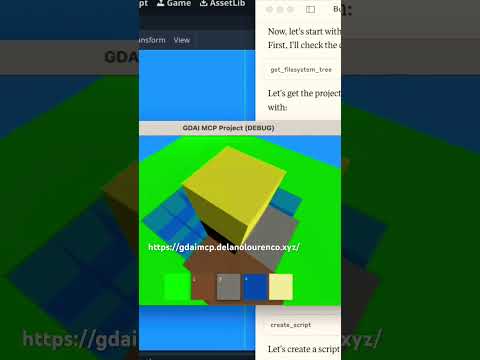](https://youtube.com/shorts/ybCBvvbGk5s?si=XFcw_BINKK1A6RHQ)
- - 3D car racing game
- [](https://youtube.com/shorts/IeYTmrZOxcU?si=WevMw8rrK-0t4rvy)
- - Create scene with nodes
- [](https://youtu.be/0dz1Nb1maco?si=KZoQm__Hx6NR9K5R)
- - Edit GDScript files
- [](https://youtu.be/oYev6V8u_Oo?si=I1eehN-Tj6kTdCWo)
- ---
- ### Installation Guide
- Check out the detailed [Installation Guide](https://gdaimcp.com/docs/installation)
- ---
- ### 🔄 Update Guide
- Check out the detailed [Update Guide](https://gdaimcp.com/docs/update-guide)
- ---
- 🔗 [Get the Plugin](https://gdaimcp.com)
- ---
- 📄 [License](https://gdaimcp.com/license)
- © 2025 Delano Lourenco. All rights reserved.
Ratings and comments
Sign in to rate this skill.
Sign inFree to use. If it’s helped, pass it on.