auto-visio-helper
Help Codex plan, generate, reproduce, and refine editable Microsoft Visio scientific diagrams. Use when users ask Codex to operate local Visio, create VSDX research figures, redraw uploaded paper screenshots or sketches in Visio, convert natural-language method descriptions into scientific diagrams, export preview PNG/PDF/SVG, or build editable model architecture, workflow, system architecture, experiment, pseudo-code, sequence, or module interaction diagrams.
Safety scan
A static text scan, not a guarantee. Select the badge to see what was scanned and every finding.
Badge for your README

Markdown
[](/listings/0antique--auto-visio-helper)HTML
<a href="/listings/0antique--auto-visio-helper"><img src="/api/listings/0antique--auto-visio-helper/badge.svg" alt="findsafeskills safety rating" /></a>Install
What was scanned
The files the safety scan read, as written by the repository's author and shown as plain text. Lines with a finding are marked.
SKILL.md · Manifest · 98 lines
View this file on GitHub (read at the repository's current version: the scan did not record which commit it read)
- ---
- name: auto-visio-helper
- description: Help Codex plan, generate, reproduce, and refine editable Microsoft Visio scientific diagrams. Use when users ask Codex to operate local Visio, create VSDX research figures, redraw uploaded paper screenshots or sketches in Visio, convert natural-language method descriptions into scientific diagrams, export preview PNG/PDF/SVG, or build editable model architecture, workflow, system architecture, experiment, pseudo-code, sequence, or module interaction diagrams.
- ---
- # Auto Visio Helper
- Use this skill to turn vague research-figure requests into editable Visio diagrams. Always plan the diagram as a verifiable drawing spec before driving local Visio.
- ## Core Workflow
- 1. Classify the task:
- - `description_to_diagram`: user describes a method, model, system, or experiment.
- - `image_reproduction`: user uploads a paper figure, sketch, PPT screenshot, or reference image.
- - `paper_redraw`: user wants a cleaner publication-ready version, not a strict copy.
- - `visio_refine`: user wants to modify an existing VSDX or exported preview.
- 2. Gather only blocking requirements:
- - Language: Chinese, English, or bilingual.
- - Target use: paper, thesis, defense slides, project report, patent, or internal note.
- - Layout width: single-column, double-column, A4, slide, or custom size.
- - Style target: IEEE, Nature-like, clean engineering, Chinese thesis, or strict reference matching.
- - Export target: always propose preview exports (`.png`, optionally `.pdf` / `.svg`) before finalizing `.vsdx`.
- 3. Produce a short design brief and a structured drawing spec first. Do not start Visio automation until the user has confirmed the spec or clearly asked to proceed without confirmation.
- 4. Render the confirmed drawing spec with `scripts/render_visio.py` when Microsoft Visio is available on Windows. Keep all diagram elements editable: use Visio shapes, connectors, text, layers, names, and groups instead of flattening the diagram into one pasted image.
- 5. Export preview files, inspect them, compare against the request or source image, then iterate on the drawing spec if needed.
- ## Required Drawing Spec
- Use JSON as the intermediate representation. Read [references/drawing_spec.md](references/drawing_spec.md) before writing a complex spec.
- Minimum shape:
- ```json
- {
- "page": {"width_mm": 297, "height_mm": 210, "unit": "mm"},
- "style": {"font": "Arial", "font_size_pt": 9, "theme": "paper_clean"},
- "nodes": [],
- "edges": [],
- "groups": [],
- "annotations": [],
- "exports": {"png": true, "pdf": false, "svg": false}
- }
- ```
- Use top-left coordinates in millimeters. Name every node and connector with stable IDs so the VSDX remains editable and reviewable.
- ## Reference Files
- Load only the file needed for the current task:
- - [references/diagram_types.md](references/diagram_types.md): choose diagram type and layout pattern.
- - [references/drawing_spec.md](references/drawing_spec.md): JSON schema and examples.
- - [references/style_guide.md](references/style_guide.md): publication-oriented fonts, colors, spacing, and line rules.
- - [references/visio_automation.md](references/visio_automation.md): local Visio COM automation notes and troubleshooting.
- If a Visio template file is present, such as `references/绘图模版.vsdx`, treat it as a reusable local template. Do not load binary templates into context; pass their path to scripts or copy them as needed.
- ## Image Reproduction Rules
- For uploaded reference images:
- 1. Decide whether the user wants structure reproduction, visual reproduction, or publication-grade redraw.
- 2. Extract visible text, modules, hierarchy, arrows, color families, and layout proportions.
- 3. Rebuild the image as editable Visio primitives. Do not paste the image as the final diagram.
- 4. Export a preview and compare these points: missing nodes, wrong arrow direction, text mismatch, layout drift, inconsistent spacing, and style mismatch.
- ## Quality Gate
- Before final delivery, verify:
- - Text does not overlap shapes or connectors.
- - Arrow direction matches the intended data/control flow.
- - Same-level modules share consistent size, alignment, and spacing.
- - Font size is readable at the target paper or slide size.
- - Color count is controlled and black-white printing remains understandable when requested.
- - Line width, arrowheads, corner radius, and padding are consistent.
- - `.vsdx` keeps editable shapes, connectors, groups, layers, and named text boxes.
- - Preview exports match the confirmed spec closely enough for user review.
- ## Script Usage
- Validate a spec without opening Visio:
- ```powershell
- python scripts/render_visio.py spec.json --dry-run
- ```
- Render with local Visio:
- ```powershell
- python scripts/render_visio.py spec.json --output output\diagram.vsdx --export-png output\diagram.png
- ```
- Use `--template references\绘图模版.vsdx` when a local Visio template should define page theme, stencils, or base styles.
README.md · README · 152 lines
View this file on GitHub (read at the repository's current version: the scan did not record which commit it read)
- # Auto-Visio-Helper
- > 把“论文图想法 / 截图 / 草图”变成真正可编辑的 Microsoft Visio `.vsdx`。
- 
- 
- 
- 
- 
- 
- **Auto-Visio-Helper** 是一个面向 Codex 的 Visio 科研绘图 skill。它不让 AI 直接“凭感觉拖拽图形”,而是先把你的自然语言需求、论文截图、PPT 截图或手绘草图整理成可检查的 JSON 绘图规范,再调用本地 Microsoft Visio 自动生成可编辑的 `.vsdx` 文件,并导出 `.png` 预览供你确认。
- 如果你也经常遇到这些问题,这个仓库就是为你准备的:
- - AI 生成的论文图很好看,但只能得到一张不可编辑的图片。
- - 论文截图想复现,手动在 Visio 里对齐、连线、调字号太耗时间。
- - 模型结构、流程图、系统架构图需要反复改版,必须保留可编辑源文件。
- - 想让 Codex 更稳定地完成科研绘图,而不是每次从零提示。
- English documentation: [README-EN.md](README-EN.md)
- ## 亮点
- - **可编辑优先**:最终产物是 Visio 形状、连接线、文本框、图层和命名对象,不是一张扁平截图。
- - **先规划再绘图**:先生成 JSON drawing spec,确认布局、风格、元素和导出格式后再渲染。
- - **适合科研图**:内置模型结构图、方法流程图、系统架构图、实验流程图、概念图、时序图等绘图模式。
- - **支持参考图复现**:可根据论文截图、PPT 截图、手绘草图重绘为可编辑 Visio 图。
- - **本地 Visio 自动化**:通过 `scripts/render_visio.py` 调用 Microsoft Visio COM 自动化生成 `.vsdx`。
- - **可预览可迭代**:支持 dry-run 校验和 `.png` 预览导出,方便逐轮修改到论文可用。
- ## 效果预览
- ### 最大池化示意图
- | 用户需求 / 参考输入 | Auto-Visio-Helper 输出 |
- | --- | --- |
- |  |  |
- ### YOLO 架构复现
- | 参考图 | 可编辑 Visio 复现效果 |
- | --- | --- |
- |  |  |
- ### 技术架构图复现
- | 参考图 | 可编辑 Visio 复现效果 |
- | --- | --- |
- |  |  |
- ## 适合场景
- - 论文方法图、总体框架图、技术路线图。
- - YOLO、Transformer、CNN、Encoder-Decoder、检测头、注意力模块等模型结构图。
- - 数据处理、训练、推理、评估、部署流程图。
- - 软件系统架构图、模块交互图、接口调用图。
- - 实验设计、消融实验、Benchmark 对比流程。
- - 将已有截图重绘为可编辑 Visio 图,方便后续投稿、答辩和汇报修改。
- ## 工作流
- ```mermaid
- flowchart LR
- A["自然语言需求 / 参考图片"] --> B["Codex 分析图类型与布局"]
- B --> C["生成 JSON drawing spec"]
- C --> D["用户确认结构、风格与导出格式"]
- D --> E["本地 Visio 渲染 .vsdx"]
- E --> F["导出 PNG 预览"]
- F --> G["检查并迭代到可投稿版本"]
- ```
- ## 快速安装
- 将仓库克隆到 Codex skills 目录:
- ```powershell
- git clone https://github.com/0Antique/Auto-Visio-Helper.git $env:USERPROFILE\.codex\skills\auto-visio-helper
- ```
- 然后重启 Codex,或按你的 Codex 环境重新加载 skills。
- ## 使用示例
- 在 Codex 中直接调用 skill:
- ```text
- Use $auto-visio-helper to create an editable Visio diagram for my YOLO11 pest detection method.
- Include dataset preprocessing, backbone, feature fusion, detection head, loss, and output prediction.
- Use a clean paper-style layout and export a PNG preview.
- ```
- 中文也可以:
- ```text
- 使用 $auto-visio-helper 帮我画一张可编辑的 Visio 论文方法图。
- 内容包括:数据预处理、主干网络、特征融合、检测头、损失函数和预测输出。
- 请先给出 JSON 绘图规范,确认后再生成 .vsdx 和 .png 预览。
- ```
- ## 运行依赖
- 只做 drawing spec 生成和 dry-run 校验:
- - Python 3.10+
- 真正调用本地 Visio 生成 `.vsdx`:
- - Windows
- - Microsoft Visio 桌面版
- - Python 包 `pywin32`
- 安装 `pywin32`:
- ```powershell
- python -m pip install pywin32
- ```
- ## 目录结构
- ```text
- Auto-Visio-Helper/
- ├── SKILL.md
- ├── README.md
- ├── README-EN.md
- ├── agents/
- │ └── openai.yaml
- ├── assets/
- │ ├── auto-visio-helper-poster-image2.png
- │ └── ...
- ├── demo/
- │ ├── max_pooling_demo.vsdx
- │ ├── yolo11_architecture.vsdx
- │ └── tech_architecture.vsdx
- ├── references/
- │ ├── diagram_types.md
- │ ├── drawing_spec.md
- │ ├── style_guide.md
- │ ├── visio_automation.md
- │ └── 绘图模版.vsdx
- └── scripts/
- └── render_visio.py
- ```
- ## Star History
- 如果这个 skill 帮你把科研绘图从“截图糊上去”推进到“可编辑、可复用、可投稿”,欢迎给项目点一个 Star。
- [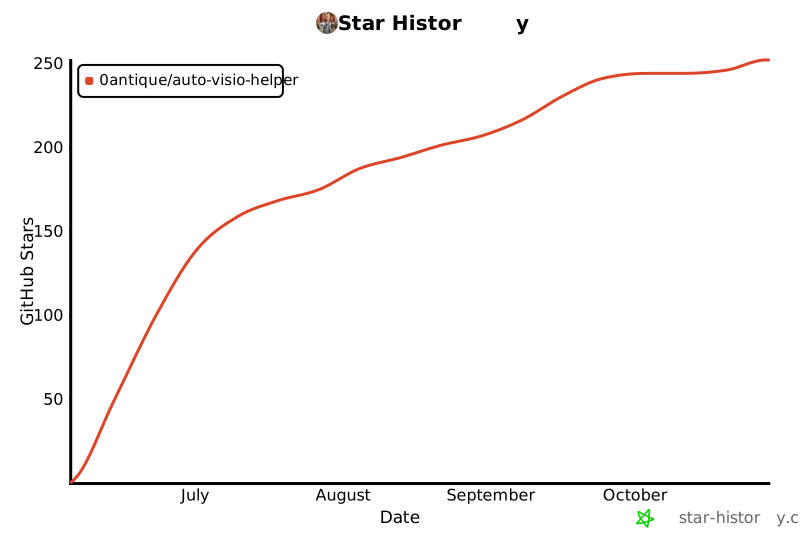](https://star-history.com/#0Antique/Auto-Visio-Helper&Date)
- > Hi,这里是Antique的AI小站。作为一名 AI Explorer,我坚信 AI 必将重塑当下生活方式,进而推动生产关系的全新变革,且终将以你我皆无法预料的形式改造人类文明。诸位,拥抱AI吧……
Ratings and comments
Sign in to rate this skill.
Sign inFree to use. If it’s helped, pass it on.